10 Free BioRender Alternatives (2026): Compared for Papers, Posters and Teaching
BioRender is excellent, but its free plan is limited to non-publication use with a watermark, and the paid plans are priced for labs rather than individual students. The good news is that in 2026 you rarely need it. Below are ten free BioRender alternatives that we use or recommend, grouped by how they work: AI generators that draw a labeled figure from a sentence, vector editors that give full control, icon libraries you can legally drop into any figure, and slide tools most people already own. For each one we note the licence, because a figure you cannot publish is not a free figure.
Quick answer: which free BioRender alternative to pick
If you need a labeled diagram in the next five minutes for a lecture, a thesis draft or a poster, use an AI scientific diagram generator such as Science Diagram: describe the figure in one sentence, choose the label language, and edit the result by instruction. If you need pixel-perfect vector control for a journal figure, use Inkscape with a free icon library such as Bioicons or NIAID BioArt. If you only need to assemble icons and arrows quickly, draw.io or PowerPoint is enough.
The rest of this guide goes through each option, what it is good at, what it cannot do, and whether you may publish the output.
- Fastest labeled figure: Science Diagram (AI, free tier of 30 diagrams a day, no watermark)
- Most control for journal figures: Inkscape + Bioicons / NIAID BioArt / Servier Medical Art
- Best for flowcharts, pathways and frameworks: draw.io (diagrams.net)
- Best if you already live in slides: PowerPoint, Keynote or Google Slides with free SVG icons
- Best 'BioRender look-alike' with a free tier: Mind the Graph (check current export limits)
1. Science Diagram — AI generator for labeled textbook-style figures
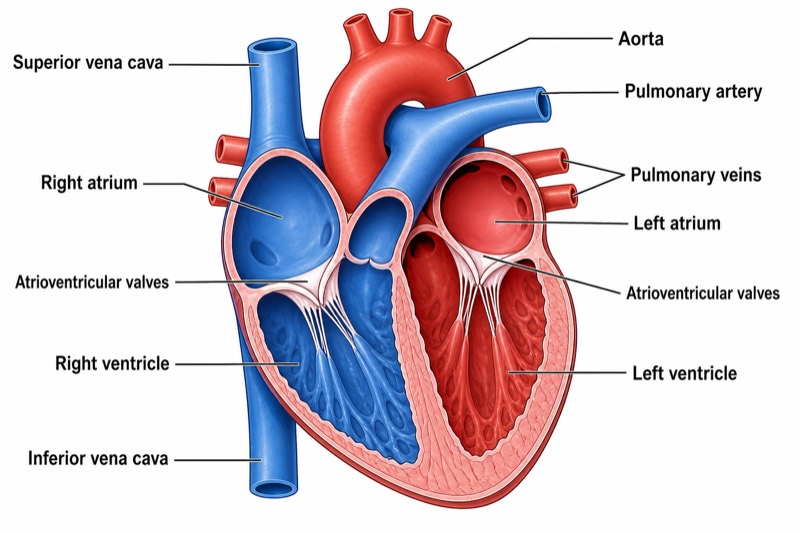
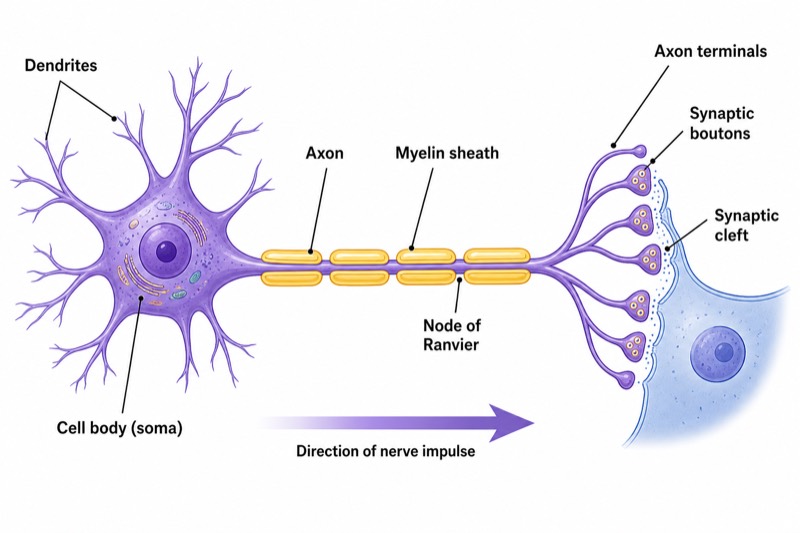
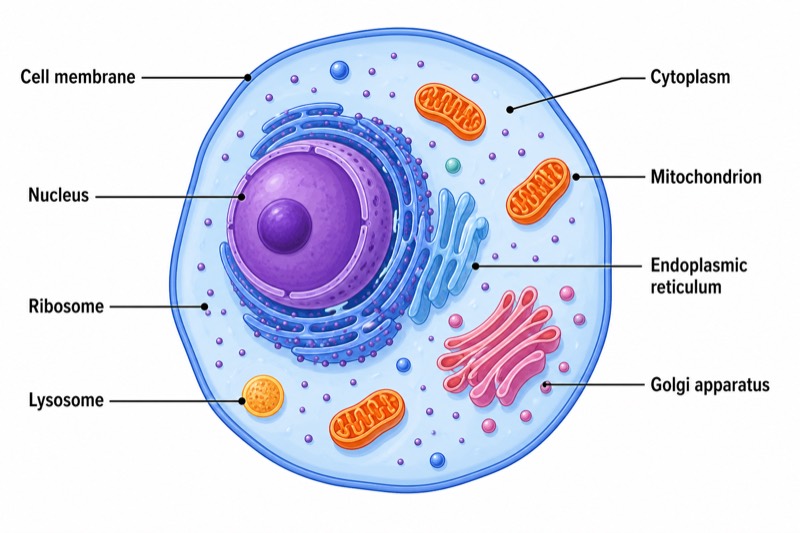
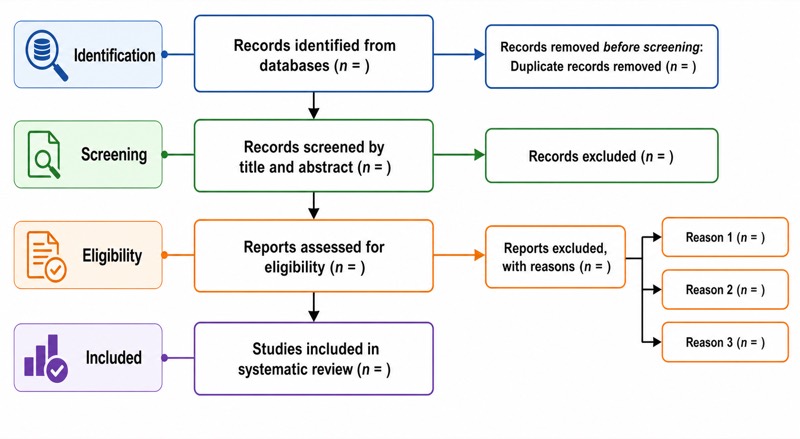
Science Diagram takes a one-sentence description and returns a fully labeled, white-background figure in about a minute. It is built for the figures BioRender users draw most: labeled cells, organ systems, neurons, cycles such as the water cycle or nitrogen cycle, and methodology figures such as PRISMA flow diagrams and conceptual frameworks.
Two things set it apart from a generic image model. First, a planning step lists every structure that must appear and be labeled before the image is drawn, so the figure is checkable. Second, labels are rendered in the language you choose — English, Chinese, Spanish, Portuguese, French, German, Russian or Japanese — which matters for teaching outside English-speaking countries. You can then change a figure by typing an instruction or by circling the area with a brush.
Limits: it is a raster (PNG) output, not editable vectors, and like every AI tool it must be checked for scientific accuracy before publication. The free tier is 30 diagrams a day with no watermark and no credit card; generated figures may be used in papers, theses and teaching.
- Best for: lecture slides, thesis figures, posters, homework, quick first drafts of paper figures
- Licence: your generated images are yours to use, including commercially
- Not for: data plots (use matplotlib or Excel) or vector-editable artwork
2. Inkscape — the open-source vector editor
Inkscape is a free, open-source alternative to Adobe Illustrator and the most complete free BioRender alternative for journal figures. You get real vector output (SVG, PDF, EPS), exact sizing in millimetres, CMYK-aware export through extensions, and full typographic control — everything a journal's figure guidelines ask for.
The price is time. Inkscape does not ship with biology icons, so pair it with one of the free libraries in sections 5 to 7. Import an SVG icon, recolour it, add arrows and labels, and export at the journal's required resolution. Once you have built one figure this way, the next ones are fast because you reuse your own components.
- Best for: final journal figures, multi-panel figures, anything that must be vector
- Licence: GPL software; output is entirely yours
- Learning curve: a few hours; worth it if you will make more than a handful of figures
3. draw.io (diagrams.net) — flowcharts, pathways and frameworks
draw.io is a free diagramming tool that runs in the browser or as a desktop app and saves to your own files or cloud drive. It is the fastest free way to draw signalling pathways, experimental workflows, fishbone diagrams, swimlane flowcharts and conceptual frameworks, because boxes, arrows and alignment are its whole purpose.
It has no biology artwork of its own, but you can import SVG icons from the libraries below and reuse them as a custom shape library. Export to SVG or PDF keeps everything vector.
- Best for: pathways, methods overviews, study designs, anything box-and-arrow
- Licence: Apache-2.0 software, your diagrams are yours
- Tip: export as SVG and finish typography in Inkscape if a journal is strict about fonts
4. PowerPoint, Keynote and Google Slides
Slide software is the BioRender alternative most people already have. Modern PowerPoint and Keynote handle SVG icons, alignment guides, grouping and high-resolution export (PowerPoint can export a slide at 300 dpi if you set the slide size to the final figure size). Google Slides is weaker on export but fine for teaching material.
For posters, slide software is often the better choice anyway: set the slide to A0 or 36 × 48 inches, use the free icon libraries below, and follow the size rules in our scientific poster font guide.
- Best for: teaching figures, posters, quick schematics in a paper draft
- Watch out: default export is 96 dpi; set the slide size and export resolution deliberately
- See also: scientific poster layout
5. Bioicons — free, searchable science icons
Bioicons is a community library of several thousand science and medicine icons in SVG, searchable by keyword and filterable by licence. Most icons are CC0 or CC BY, so they can be used in publications with, at most, an attribution line. Download the SVG and drop it into Inkscape, draw.io or PowerPoint.
- Best for: cells, organelles, lab equipment, organisms, molecules
- Licence: shown per icon (mostly CC0 / CC BY) — keep the attribution when required
6. NIAID BioArt — public-domain biomedical illustrations
NIAID BioArt, from the US National Institute of Allergy and Infectious Diseases, offers a large set of professionally drawn biomedical illustrations — pathogens, cells, anatomy, lab workflows — released into the public domain. Quality is consistent and the style is close to what people expect from BioRender.
- Best for: immunology, microbiology, clinical and anatomy figures
- Licence: public domain, no attribution required
7. Servier Medical Art — 3,000+ medical illustrations under CC BY
Servier Medical Art (SMART) has been a staple of medical figures for more than a decade: thousands of anatomy, cell and pathology illustrations, downloadable as SVG or PowerPoint slides. The licence is Creative Commons Attribution 4.0, so a short credit line in the figure legend is all that is required for publication.
- Best for: medicine, physiology, pharmacology
- Licence: CC BY 4.0 — cite 'Servier Medical Art' in the legend
8. SciDraw and other CC BY drawing collections
SciDraw hosts illustrations contributed by scientists — animals, organs, apparatus, neuroscience — under CC BY. Coverage is uneven but often includes the exact model organism or setup you need. Similar collections exist for specific fields; search for your organism plus 'SVG CC BY' before drawing anything from scratch.
- Best for: model organisms, behavioural setups, neuroscience
- Licence: CC BY per drawing
9. Mind the Graph and other freemium BioRender look-alikes
Several commercial tools imitate the BioRender workflow — a canvas plus a searchable icon library — and offer a free plan. Mind the Graph is the best known; others come and go. They are convenient, but free plans typically restrict export resolution, add a watermark, or limit the number of creations, and the terms change often. Read the current plan page before committing a figure you intend to publish.
- Best for: people who want the BioRender feel and are willing to live with free-plan limits
- Watch out: watermarks, low-resolution export and non-commercial clauses on free tiers
10. Chemistry: ChemDraw alternatives instead of BioRender
If the figure is a chemical structure or reaction scheme, none of the above is the right tool. Use a structure editor — see our separate guide to free ChemDraw alternatives — or generate a labeled molecular structure diagram with Science Diagram for teaching.
- Best for: structures, mechanisms, reaction schemes
- See also: benzene structure, Lewis structures
Can you publish figures made with free BioRender alternatives?
Yes, provided the licence of every element allows it. Public-domain (NIAID BioArt) and CC0 assets need nothing. CC BY assets (Servier, most of Bioicons, SciDraw) need a credit line in the legend or acknowledgements. Figures you draw yourself in Inkscape, draw.io or PowerPoint are your own work. AI-generated figures from Science Diagram are yours to use; many journals now ask you to state that a figure was AI-assisted and to confirm you checked it, so keep the prompt and review the labels.
What you cannot do is take a screenshot of a BioRender free-plan figure and publish it — that is exactly what its free licence excludes, and it is the reason most people search for an alternative in the first place.
- Keep a note of which icon came from where; it saves time when the journal asks
- Export at the journal's required dpi or as vector; free tools handle this fine if you set it deliberately
- Check AI-generated labels against a textbook before submission
FAQ about this diagram
What is the best free BioRender alternative for research papers?
For final journal figures, Inkscape with free CC BY or public-domain icon libraries (Bioicons, NIAID BioArt, Servier Medical Art) gives vector output and full control. For a fast labeled draft or a teaching figure, an AI generator such as Science Diagram is quicker.
Is there a completely free version of BioRender?
BioRender's own free plan is for non-publication use and adds a watermark. Fully free alternatives with publication rights are Inkscape, draw.io, and the icon libraries NIAID BioArt (public domain) and Servier Medical Art (CC BY).
Can I use AI-generated diagrams in a published paper?
Usually yes, if you disclose that the figure was AI-assisted where the journal requires it and you have verified every label. Science Diagram figures are yours to use, and its planning step lists every labeled structure so the figure is easy to check.
Which BioRender alternative works for German, Spanish or Japanese labels?
Icon libraries are language-neutral, so any vector editor works. If you want the labels generated for you, Science Diagram renders labels in eight languages including German, Spanish, French, Portuguese, Russian, Japanese and Chinese.