Swimlane Flowchart Generator
Free online Swimlane Flowchart generator: get a fully labeled figure in about 90 seconds. The AI plans the must-have label list first, then renders a clean textbook-style diagram — every label editable afterwards, ready for papers, assignments and slides.
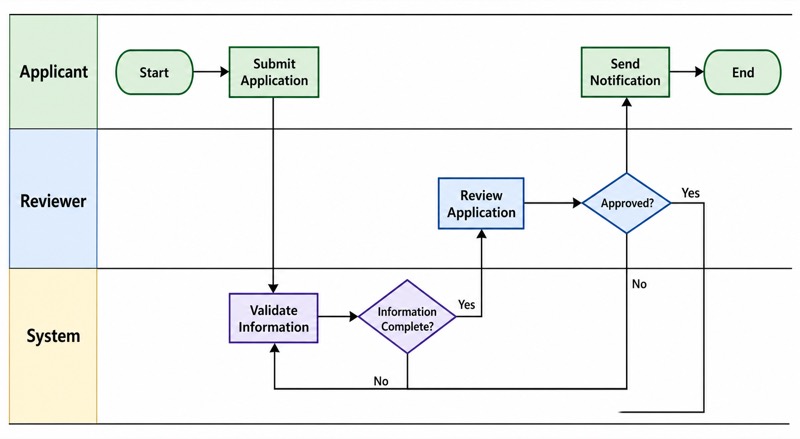
Labels included in this diagram
- Applicant
- Reviewer
- System
- Start
- Submit Application
- Validate Information
- Information Complete?
- Review Application
- Approved?
- Send Notification
- End
✓ Accurate labels ✓ Edit text after generation ✓ PNG for papers, posters & slides
 OUTPUT · 16:9 · PNG
What this diagram shows
This Swimlane Flowchart models an application-review process distributed among three participants: Applicant, Reviewer, and System. The Applicant starts the process by submitting an application. The System then validates the information and evaluates the decision point Information Complete? If information is missing, the process returns to the Applicant for correction or additional submission. If the information is complete, the Reviewer examines the application and reaches the decision Approved? The System communicates the result through Send Notification, after which the process ends. The diagram therefore represents both procedural order and responsibility allocation.
Each swimlane indicates who performs an activity, while arrows show the chronological and logical flow between activities. Rounded rectangles represent the Start and End events; rectangles represent actions such as Submit Application, Validate Information, Review Application, and Send Notification; diamonds represent binary decisions. Cross-lane arrows are especially important because they show handoffs between people and the System. Decision branches should be labeled with conditions such as Yes and No. A No branch from Information Complete? should return to the Applicant, whereas a decision at Approved? should lead to the appropriate notification outcome before End.
What a correct diagram must include
- Clear swimlanes: Label each lane with a responsible role or system, such as Applicant, Reviewer, or System, so ownership of every action is unambiguous.
- Defined start and end events: Use one Start and one End where appropriate to establish the process boundary and prevent an open-ended diagram.
- Correct activity symbols: Draw ordinary process steps as rectangles and phrase them with concise verb-object labels, such as Validate Information.
- Explicit decision points: Use diamonds for conditions such as Information Complete? and Approved?, with clearly labeled Yes and No branches.
- Consistent process direction: Arrange the main flow in a readable direction, commonly left to right or top to bottom, and avoid unnecessary arrow crossings.
- Accurate cross-lane handoffs: Connect arrows across lanes when responsibility changes, making communication or transfer between participants visible.
- Complete exception paths: Show what happens when information is incomplete or an application is rejected; every decision branch should lead to a valid next step.
Common mistakes
- Placing an activity in the wrong lane, such as putting Review Application in the System lane, which confuses responsibility with automation.
- Using a rectangle for a question or a diamond for an action, thereby mixing process symbols and weakening the diagram's logic.
- Drawing a decision without labeling its outgoing branches, so the reader cannot determine which path represents Yes, No, approval, or rejection.
- Showing only the successful route and omitting the return path when Information Complete? is No or the alternative outcome when Approved? is No.
- Connecting steps by proximity rather than by arrows, which can hide the direction of a cross-lane handoff or create an unintended sequence.
Teaching tips
Use this diagram during an introduction to process modeling, responsibility analysis, or conditional logic. Ask students, "Who performs this step?" "What condition is tested here?" and "Where does the No branch go?" Then have them trace one successful path and one exception path, explaining each symbol and handoff aloud. It supports assessment of sequencing, role allocation, decision branching, feedback loops, and the distinction between an actor's task and an automated system operation.
FAQ about this diagram
What is the main purpose of a Swimlane Flowchart?
Its main purpose is to combine process sequence with responsibility. The lanes show who performs each activity, while the connected symbols show what happens and in what order.
Why must decision branches be labeled?
A diamond represents a condition, not an action, so its outgoing arrows need labels such as Yes and No. Labels make the alternative paths and their logical meaning explicit.
How is a Swimlane Flowchart different from an ordinary flowchart?
Both diagrams represent process flow with standard symbols. A Swimlane Flowchart adds lanes that group activities by person, department, role, or system, making handoffs and accountability easier to analyze.