Entity-Relationship Diagram Generator
Free online Entity-Relationship Diagram generator: get a fully labeled figure in about 90 seconds. The AI plans the must-have label list first, then renders a clean textbook-style diagram — every label editable afterwards, ready for papers, assignments and slides.
Labels included in this diagram
- Student
- student_id
- name
- Enrollment
- enrollment_id
- Course
- course_id
- course_name
- registers
- includes
- 1:N
- M:N
✓ Accurate labels ✓ Edit text after generation ✓ PNG for papers, posters & slides
 OUTPUT · 16:9 · PNG
What this diagram shows
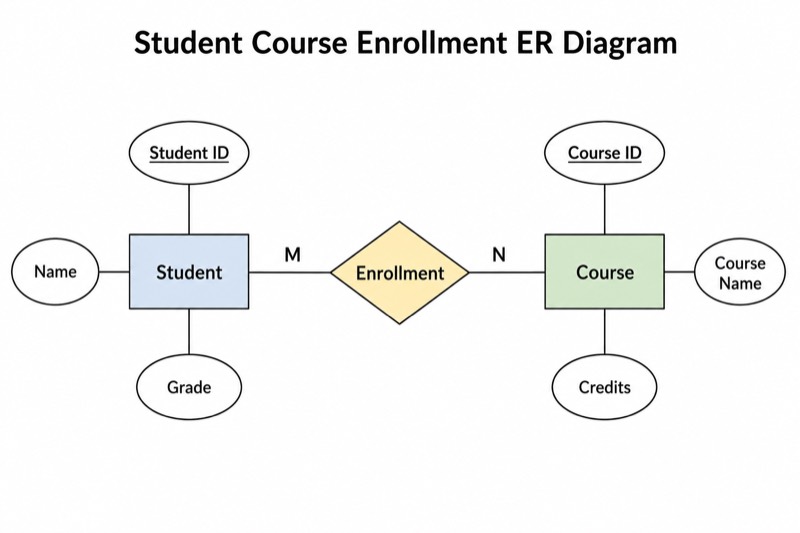
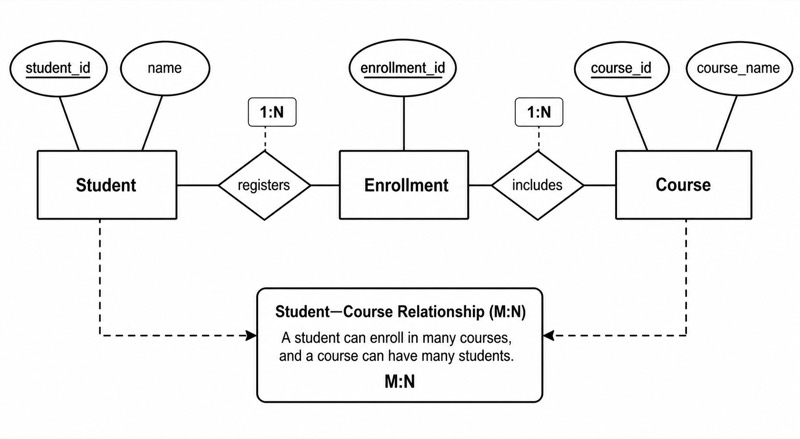
This ER diagram models a university course-registration domain through three entities: Student, Enrollment, and Course. Each entity is drawn as a rectangle, while its attributes appear as connected ellipses. Typical attributes include Student_ID and Student_Name for Student, Enrollment_ID and Enrollment_Date for Enrollment, and Course_ID and Course_Title for Course. Primary-key attributes are underlined to show that they uniquely identify entity instances. Diamonds represent relationships, and cardinality labels specify how many instances of one entity may be associated with instances of another.
Student and Course have a conceptual M:N relationship because one student may take many courses and one course may contain many students. Enrollment acts as an associative entity that resolves this many-to-many relationship into two one-to-many relationships: Student 1:N Enrollment and Course 1:N Enrollment. Each Enrollment instance must reference exactly one Student and one Course, normally through Student_ID and Course_ID as foreign keys. Registration-specific attributes, such as Semester, Grade, or Enrollment_Date, belong to Enrollment rather than directly to Student or Course.
What a correct diagram must include
- Entity rectangles: Include Student, Enrollment, and Course as clearly named rectangles using singular nouns.
- Attribute ellipses: Connect each attribute ellipse directly to the entity or relationship that it describes.
- Underlined primary keys: Underline Student_ID, Enrollment_ID, and Course_ID, or show the appropriate composite key for Enrollment.
- Relationship diamonds: Use diamonds with meaningful verb phrases, such as registers through or belongs to, rather than vague labels.
- Cardinality labels: Mark Student-to-Enrollment and Course-to-Enrollment as 1:N, and recognize the resulting Student-to-Course association as M:N.
- Participation constraints: Indicate whether participation is mandatory or optional, because cardinality alone does not show minimum participation.
- Associative-entity logic: Place registration-specific attributes in Enrollment so that facts about one student's registration in one course are stored correctly.
Common mistakes
- Drawing Student and Course with a direct M:N relationship but failing to add Enrollment when the relationship has attributes such as Grade or Semester.
- Underlining foreign keys as if they were automatically primary keys; a foreign key is underlined only when it is part of the chosen primary key.
- Reversing 1:N labels, implying that one Enrollment record can refer to many students or many courses.
- Attaching Grade or Enrollment_Date to Student or Course, even though these values depend on a particular student-course registration.
- Using rectangles, ellipses, and diamonds inconsistently, which makes entities, attributes, and relationships difficult to distinguish.
Teaching tips
Use the diagram after introducing entities, attributes, keys, and cardinality constraints. Ask students to identify which facts describe Student, Course, or a specific registration, then challenge them to explain why Grade belongs to Enrollment. Next, have them convert the conceptual M:N Student-Course relationship into two 1:N relationships. This supports assessment of primary keys, foreign keys, associative entities, participation constraints, and ER-to-relational schema mapping.
FAQ about this diagram
Why is Enrollment modeled as an associative entity?
Student and Course form an M:N relationship that cannot be implemented directly in a conventional relational schema. Enrollment provides one record for each student-course pairing and can store relationship-specific attributes such as Semester and Grade.
Should Enrollment use a surrogate key or a composite primary key?
Either design can be valid. Enrollment_ID may serve as a surrogate primary key, while a composite key such as Student_ID, Course_ID, and Semester can enforce the natural uniqueness of a registration.
What is the difference between cardinality and participation?
Cardinality specifies the maximum number of related instances, such as 1:N or M:N. Participation specifies the minimum, distinguishing optional participation from mandatory participation.